Introduction
The Masspay payout instruction functionality is implemented to allow a user to perform multiple payout requests with a single click. Efficiency and productivity are the main drivers of this feature as it allows a user to perform up to 1000 payouts in a single operation.
The focus of this guide is version 2 of the Masspay payout instruction functionality via API using EUR or GBP. In order to make use of the EU and/or the UK Masspay service, your ISX relationship manager needs to apply the relevant configuration settings.
📖 Remittances (via API) in currencies other than EUR or GBP are described in Remittance.
ℹ️ What is an Application Programming Interface (API)?
An API is a way for two or more apps to communicate with each other. An API is a type of software interface offering a service to other pieces of software. APIs work by sharing data between apps, systems, and devices. This happens through a request and response cycle. A user initiates a request for data by interacting with an app. The request is sent to an API, which retrieves the data and then returns it to a user. A document that describes how to build or use such a connection or interface is called an API specification.
⚠️ This API documentation makes extensive use of country codes expressed as ISO 3166-1 Alpha-2 and currency codes expressed as ISO 4217. The links provide relevant reference material.
Authentication
For authentication purposes, Masspay v.2 does not use encryption handling on the ISX side - everything is handled in the backend. A merchant just authenticates.
JWT
ℹ️ What is a JSON Web Token (JWT)?
JWT is a compact, URL-safe means of representing claims to be transferred between 2 parties. Essentially, it is a standardised way to securely transmit data between systems as a JSON object. JWTs are often used for authentication and authorization in web applications and APIs. Tokens are signed either using a private secret or a public/private key.
Authorization header
HTTP header: a bearer token must provided.
Getting a token
To get a token, sign into the Masspay dashboard:
- Stage dashboard: https://masspay-stage.isxtech.com
- Production dashboard: https://masspay.isxtech.com
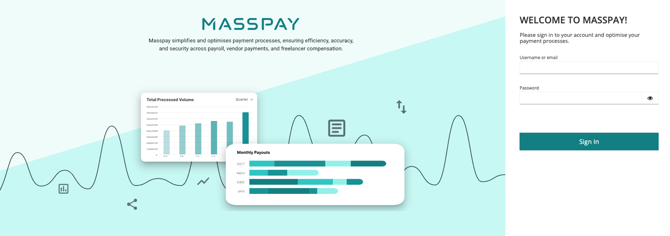
On the right-hand menu, click on the Manage API keys option.
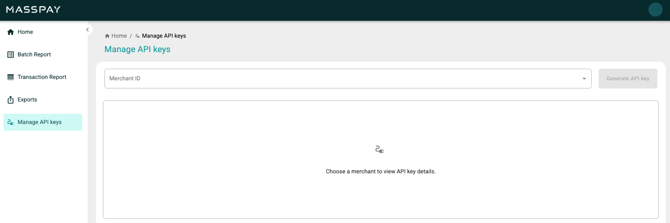
This section allows a user to generate and manage API keys.
ℹ️ The Manage API keys option is only available if the API option and associated configurations have been enabled for a merchant by an admin.
Only merchant users who have the Key Manager role assigned to them will be able to view the Manage API keys menu option in the Masspay dashboard. These users are able to create and/or view API keys for Masspay v.2.
An API key is a unique code used to authenticate and authorize access to an application programming interface (API). It acts as a secret token, enabling applications and/or users to identify themselves to the API provider and access specific resources or functionalities. It can be thought of as a digital key that unlocks access to a specific set of features or data within an application.
Select a merchant ID from the Merchant ID dropdown widget.
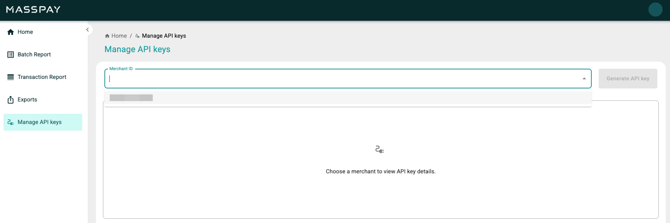
Any existing API key data will be retrieved & displayed.
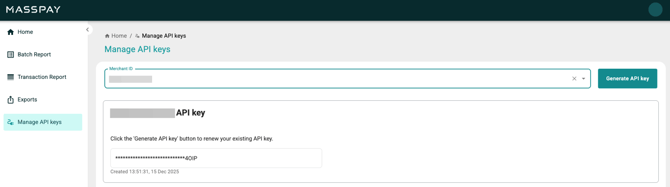
Click on the Generate API key button to create an API key.
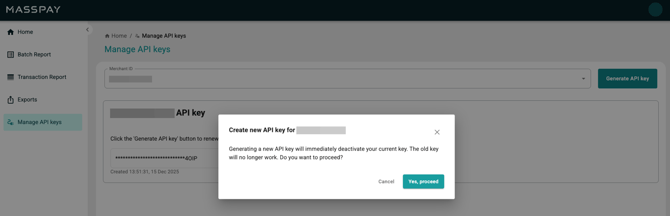
A pop-up window will advise the user that generating a new API key will replace the current key immediately and that the old key will cease functioning. The user is called to confirm whether they would like to proceed. Click on the Yes, proceed button.
An API key will be generated and displayed in the main body of the screen.
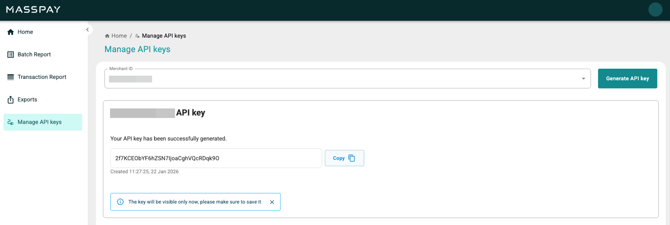
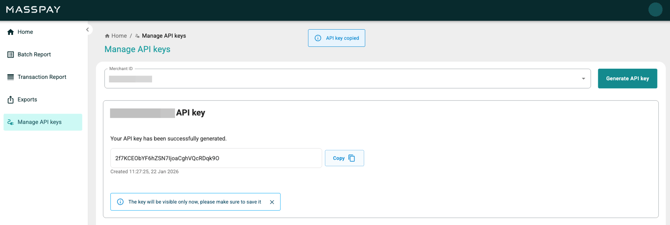
Use the Copy button to copy the generated key to memory.
⚠️ If you require assistance, contact your ISX Relationship Manager.
For security reasons, the API key is only visible whilst it is being viewed on the screen. It is advisable to save it for future reference.
When a user navigates away from the Manage API keys page, then the API key is masked, as the per the screenshot below.
Retrieval of JWT
Postman
Request Method: POST
The API is accessed from the Request URL.
- Stage:
https://auth-stage.isxtech.com/realms/corporate/protocol/openid-connect/token - Production:
https://auth.isxtech.com/realms/corporate/protocol/openid-connect/token
Required Body (x-www-form-urlencoded)
|
Field name |
Field value |
|
|
{merchant_id} |
|
|
{client_secret} |
|
|
client_credentials |
Example:
|
Field name |
Field value |
|
|
Test.merchant101.Payouts |
|
|
LC3SSRFC9XWH9DLE2N4TEA3GVC6FKMQH108QDV |
|
|
client_credentials |
cURL
curl --location '{auth-url}/realms/corporate/protocol/openid-connect/token' \--header 'Content-Type: application/x-www-form-urlencoded' \--data-urlencode 'client_id=Test.merchant101.Payouts' \--data-urlencode 'client_secret=LC3SSRFC9XWH9DLE2N4TEA3GVC6FKMQH108QDV' \--data-urlencode 'grant_type=client_credentials'
Response
Successful
{ "access_token": "eyJhbGciOiJSUzI1NiIs...7j6ZfCKxZ7LHCNg", "expires_in": 1800, "refresh_expires_in": 0, "token_type": "Bearer", "not-before-policy": 0, "scope": "email profile"}
Failed
{ "error": "invalid_client", "error_description": "Invalid client or Invalid client credentials"}
|
API response field |
Example |
Comment |
|
|
eyJhbGciOiJSUzI1NiIs… |
Retrieved by logging into the Masspay dashboard & it is added to the header. |
|
|
1800 |
Expressed is seconds & refers to how long it is active. |
|
|
0 |
Refresh expires in 0 seconds because no refresh token is present. |
|
|
bearer |
Type of token bearer & usually implies presenting a JWT for stateless auth. |
|
|
0 |
|
|
|
email profile |
This can contain default or optional scopes. |
API batch request
The base stage URL is: https://masspay-api-stage.isxtech.com
The base production URL is: https://masspay-api.isxtech.com
Submit batch
Request method: Post
Content-Type: application/json
Endpoint: /v2/batch
This submits a payout batch. A batch will need to be approved to actually start execution.
Dataset details
Payload table
|
Batch details |
Mandatory |
Comment |
|
|
Yes |
|
|
|
Conditional |
This is one of the merchant’s IBANs. Select only one IBAN. This applies to EUR (& remittance) or GBP. |
|
|
Conditional |
Valid account number. This applies to GBP only. |
|
|
No |
Accepts alphanumeric characters. |
|
|
No |
Accepts alphanumeric characters. |
ℹ️ In the case of GBP, either sender_iban or sender_account_number can be used.
⚠️ Character sets
Restrictions are imposed by transfer protocols on allowed character sets. SEPA only accepts the basic Latin character set to ensure seamless processing across all European banks:
· letters: A-Z (uppercase) & a-z (lowercase)
· numbers: 0-9
· special characters: /, -, ?, :, (, ), ., ,, ', +, and {space}.
|
Record name |
Mandatory |
Comment |
|
|
Yes |
Accepts alphanumeric characters. |
|
|
Yes |
Accepts alphanumeric characters. |
|
|
Yes |
Accepts alphanumeric characters. |
|
|
Conditional |
Valid IBAN. This applies to EUR or GBP. |
|
|
Conditional |
Valid sort code. This applies to GBP only. |
|
|
Conditional |
Valid account number. This applies to GBP only. |
|
|
Yes |
Depends on merchant config. |
|
|
Yes |
Only EUR or GBP is accepted. Expressed as ISO 4217. |
|
|
Yes |
Unique for each record. |
|
|
Conditional |
This applies to both EUR & GBP, but it is mandatory for GBP. |
|
|
Conditional |
This applies to both EUR & GBP, but it is mandatory for GBP. |
|
|
Conditional |
This applies to both EUR & GBP, but it is mandatory for GBP. Expressed as ISO 3166-1. |
ℹ️ In the case of GBP, either beneficiary_iban or both beneficiary_sort_code and beneficiary_account_number can be used.
If payouts are being sent to a business (i.e., B2B), then the following fields must be included in the API request:
|
Record name |
Mandatory |
Comment |
|
|
Conditional |
This only applies to Business-2-Business. |
|
|
Conditional |
This only applies to Business-2-Business. |
|
|
Conditional |
This only applies to Business-2-Business. |
|
|
Conditional |
This only applies to Business-2-Business. |
Payload samples
EUR
{ "merchant_id": "Merchant101", "sender_iban": "CY21002001950000357001234565", "description": "API payout", "callback_url": "https://webhook.site/0c7db59d-73f8-4f5d-ac5a-f0c3bd98ec9a", "batch_records": [ { "payment_details": "My Details", "beneficiary_name": "Joe Doe", "beneficiary_reference": "Payment 05/25", "beneficiary_iban": "CY21002001950000357001234567", "payment_amount": "200", "currency": "EUR", "reference_id": "9de38ba8-8a1b-4015-b307-7aeea4042507" } ]}
GBP (using IBANs)
{ "merchant_id": "Merchant102", "sender_iban": "GB29NABK60161221945818" "description": "API payout", "callback_url": "https://webhook.site/0c7db59d-73f8-4f5d-ac5a-f0c3bd98ec9a", "batch_records": [ { "payment_details": "My Details", "beneficiary_name": "Joe Doe", "beneficiary_reference": "Payment 05/25", "beneficiary_iban": "GB29NWBK60161331926819", "payment_amount": "200", "currency": "GBP", "reference_id": "9de38ba8-8a1b-4015-b307-7aeea4042507" "beneficiary_address": "ClearKings Square N5 1AD", "beneficiary_city": "London", "beneficiary_country": "United Kingdom" } ]}
GBP (using account numbers & sort codes)
{ "merchant_id": "Merchant102", "sender_account_number": "31926819", "description": "API payout", "callback_url": "https://webhook.site/0c7db59d-73f8-4f5d-ac5a-f0c3bd98ec9a", "batch_records": [ { "payment_details": "My Details", "beneficiary_name": "Joe Doe", "beneficiary_reference": "Payment 05/25", "beneficiary_sort_code": "123456", "beneficiary_account_number": "98765432", "payment_amount": "200", "currency": "GBP", "reference_id": "9de38ba8-8a1b-4015-b307-7aeea4042507" "beneficiary_address": "ClearKings Square N5 1AD", "beneficiary_city": "London", "beneficiary_country": "GB" } ]}
📖 Remittances (via API) in currencies other than EUR or GBP are described in Remittance.
cURL: create an API request
EUR
curl --location 'https://masspay-api.isxtech.com/v2/batch' \--header 'Content-Type: application/json; charset=utf-8' \--header 'Accept: application/json' \--header 'Authorization: Bearer *****' \--data '{ "merchant_id": "Merchant101", "sender_iban": "CY21002001950000357001234565", "description": "API payout", "callback_url": "https://webhook.site/0c7db59d-73f8-4f5d-ac5a-f0c3bd98ec9a", "batch_records": [ { "payment_details": "My Details", "beneficiary_name": "Joe Doe", "beneficiary_reference": "Payment 05/25", "beneficiary_iban": "CY21002001950000357001234567", "payment_amount": "200", "currency": "EUR", "reference_id": "9de38ba8-8a1b-4015-b307-7aeea4042507" } ]}'
GBP (using IBANs)
curl --location 'https://masspay-api.isxtech.com/v2/batch' \--header 'Content-Type: application/json; charset=utf-8' \--header 'Accept: application/json' \--header 'Authorization: Bearer *****' \--data '{ "merchant_id": "Merchant102", "sender_iban": "GB29NABK60161221945818" "description": "API payout", "callback_url": "https://webhook.site/0c7db59d-73f8-4f5d-ac5a-f0c3bd98ec9a", "batch_records": [ { "payment_details": "My Details", "beneficiary_name": "Joe Doe", "beneficiary_reference": "Payment 05/25", "beneficiary_iban": "GB29NWBK60161331926819", "payment_amount": "200", "currency": "GBP", "reference_id": "9de38ba8-8a1b-4015-b307-7aeea4042507" "beneficiary_address": "ClearKings Square N5 1AD", "beneficiary_city": "London", "beneficiary_country": "GB" } ]}'
GBP (using account numbers & sort codes)
curl --location 'https://masspay-api.isxtech.com/v2/batch' \--header 'Content-Type: application/json; charset=utf-8' \--header 'Accept: application/json' \--header 'Authorization: Bearer *****' \--data '{ "merchant_id": "Merchant102", "sender_account_number": "31926819", "description": "API payout", "callback_url": "https://webhook.site/0c7db59d-73f8-4f5d-ac5a-f0c3bd98ec9a", "batch_records": [ { "payment_details": "My Details", "beneficiary_name": "Joe Doe", "beneficiary_reference": "Payment 05/25", "beneficiary_sort_code": "123456", "beneficiary_account_number": "98765432", "payment_amount": "200", "currency": "GBP", "reference_id": "9de38ba8-8a1b-4015-b307-7aeea4042507" "beneficiary_address": "ClearKings Square N5 1AD", "beneficiary_city": "London", "beneficiary_country": "GB" } ]}'
Response
{ "batch_id": "d6729934-6df9-4d3e-9fc8-4112847680f3", "total_amount": 11.11}
Get batch state
Request method: Get
Content-Type: application/json
Endpoint: /v2/batch/{batchUid}
Get information for a previously submitted batch.
cURL: create an API request
curl --location 'https://masspay-api.isxtech.com/v2/batch/{batch_id}' \--header 'Accept: application/json' \--header 'Authorization: Bearer *****'
Response
{ "state": "PROCESSING"}
Get batch details
Request method: Get
Content-Type: application/json
Endpoint: /v2/batchdetails/{batchUid}
Get statuses of all transactions associated with a previously submitted batch.
cURL: create an API request
curl --location 'https://masspay-api.isxtech.com/v2/batchdetails/{batch_id}' \--header 'Accept: application/json' \--header 'Authorization: Bearer ****'
Response
Successful
{ "batch_details": [ { "reference_id": "19df924f-2c07-47e9-9028-3d31d21e6f52", "status": "COP_PENDING_APPROVAL", "transaction_id": "51175033-9aba-4822-a11f-f9bdb6b2f92b", "verification_status": "Confirmation of Payee check failed" } ]}
Failed
{ "error_id": "ERR401A", "message": "Unauthorized", "code": 401}
Batch statuses
|
Batch status |
Final |
Comment |
|
|
No |
Submitted batch request received. Batch is being loaded & validated. User review may be required. |
|
|
No |
User has confirmed to proceed with a batch submission but there are conditions in place to require approval by someone else. |
|
|
Yes |
User has decided not to proceed with a previously submitted batch. |
|
|
Yes |
Batch encountered a fatal error, or it never received confirmation for proceeding or cancelling. |
|
|
No |
Transactions are being processed. |
|
|
No |
Transactions have been executed using instant processing. However, even if a transaction fails, the system will use alternative methods. |
|
|
Yes |
All transactions in a batch have been finalised. |
Transaction statuses
|
Transaction status |
Final |
Comment |
|
|
No |
Transaction execution is initiated. But, before transferring any funds pertaining to the transaction, further validations take place. |
|
|
No |
Transaction execution is initiated. But, before transferring any funds of the transaction, VoP approval is required. Refer to Verification of Payee below for more info. |
|
|
No |
Transaction execution is initiated. But, before transferring any funds of the transaction, CoP approval is required. Refer to Confirmation of Payee below for more info. |
|
|
No |
Transaction execution is initiated. VoP/CoP approval has been granted. |
|
|
Yes |
Upon review, user decided not to proceed with transaction execution or the transaction was canceled on VoP/CoP review. |
|
|
Yes |
A transaction has encountered a fatal error, for example, it failed validation or one of the dependent systems is experiencing issues. |
|
|
Yes |
Transaction rejected because it was rejected by an external system, for example, rejected because of compliance issues. |
|
|
Yes |
A transaction has been processed successfully & has been settled. |
Batch approval methods
There are 3 options for batch approval:
- Manual approval (a user must log into the Masspay dashboard & manually approve transactions/batches).
- Auto-approval (you can confirm to us the number of transactions which will trigger the ‘auto-approval’ feature).
- End of Day auto-approval (if the ‘auto-approval’ number of transactions is not reached by the daily cut-off time (i.e., 22:00 UTC time, which is 00:00 CY time), the transaction/batches will be processed).
If you wish to set or update an approval method, please contact your ISX Relationship Manager.
Verification & confirmation
Verification of Payee
ℹ️ What is Verification of Payee (VoP)?
VoP refers to a security process that checks if a name on a bank account matches an account number provided for a payment. It prevents fraud and misdirected payments by verifying payee details against the recipient bank's records before a transaction is completed. This is an EU-specific service.
Approve VoP
Request body
Request method: Post
Content-Type: application/json
Endpoint: /v2/vop/approve/{batchUid}
Example value
|
Requirements |
Mandatory |
Comment |
|
|
Yes |
A transaction ID (or a list of transaction IDs) in VOP_PENDING_APPROVAL status must be provided. |
[ "3fa85f64-5717-4562-b3fc-2c963f66afa6"]
Reject VoP
Request body
Request method: Post
Content-Type: application/json
Endpoint: /v2/vop/reject/{batchUid}
Example value
|
Requirements |
Mandatory |
Comment |
|
|
Yes |
A transaction ID (or a list of transaction IDs) in VOP_PENDING_APPROVAL status must be provided. |
[ "3fa85f64-5717-4562-b3fc-2c963f66afa6"]
Confirmation of Payee
ℹ️ What is Confirmation of Payee (CoP)?
CoP is an account name-checking service that is designed to help reduce misdirected payments and provide greater assurance that payments are being sent, and collected from, the intended account holder for UK domestic payments (applies only to FPS payments). This is a UK-specific service.
Approve CoP
Request body
Request method: Post
Content-Type: application/json
Endpoint: /v2/cop/approve/{batchUid}
Example value
|
Requirements |
Mandatory |
Comment |
|
|
Yes |
A transaction_id (or a list of transaction_ids) in COP_PENDING_APPROVAL status must be provided. |
[ "3fa85f64-5717-4562-b3fc-2c963f66afa6"]
Reject CoP
Request body
Request method: Post
Content-Type: application/json
Endpoint: /v2/cop/reject/{batchUid}
Example value
|
Requirements |
Mandatory |
Comment |
|
|
Yes |
A transaction ID (or a list of transaction IDs) in COP_PENDING_APPROVAL status must be provided. |
[ "3fa85f64-5717-4562-b3fc-2c963f66afa6"]
Callbacks
📖 Note that this is optional.
Callbacks refers to the channel that is used for notification purposes.
This happens on:
- Batch status changed (incl. finalisation).
- End of day for non-finalised batches of the last 5 days.
Receiving callbacks
Request method: POST
Headers:
- Content-Type: application/json
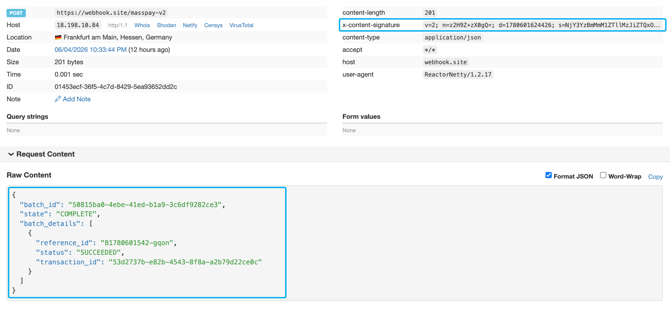
- X-Content-Signature:
v=2; n=3a858TQZIOE=; d=1750076225089; s=ZmZiNjVmMWZhZTQ...Y2ODk2Y2M1MDFkZmI=
This should be between 30 and 45 characters long, composed of both uppercase and lowercase characters with numbers.
ℹ️ The callback can only contain the 'X-Content-Signature’ header, if the HMAC was provided during the onboarding process.
If this is relevant to you, please generate an HMAC & provide it your ISX relationship manager in order to configure this functionality for you.
SubmitBatchRequest.json:
{"merchant_id":"Merchant101","sender_iban":"CY70904000010000001304356700","description":"My payout" ,"callback_url":"https://example.com/webhook","batch_records":[{"payment_details":"Payment 02/21","beneficiary_name":"John Doe","beneficiary_reference":"Withdraw 123456","beneficiary_iban":"CY92904000010000001479486700","payment_amount":"1.00","currency":"EUR","reference_id":"54321"}]}
Enhanced notifications are now provided:
{ "batch_id": "72157828-8431-4f0b-85a0-b8656373109e", "state": "PENDING_APPROVAL", "batch_details": [ { "reference_id": "6797f4e3-58aa-4521-91ec-6d0b6e0f206d", "status": "PENDING", "transaction_id": "2b7af654-876e-494b-8cff-193c967dfec0" }, { "reference_id": "918dbdfc-dc15-43ac-940c-1d3495d249a4", "status": "PENDING", "transaction_id": "bc3914a5-3627-4e4d-8d4f-1577a076c0a8" }, { "reference_id": "0ca9b56a-2eb9-41b3-ae14-cca27c92df88", "status": "PENDING", "transaction_id": "e42d6cd2-d832-4fb2-a437-24b50a895f78" }, { "reference_id": "219a73f4-2f58-4576-b3b0-c3b107bc50a2", "status": "PENDING", "transaction_id": "93e255cc-8f7f-4fc8-a812-c933bf387c48" }, { "reference_id": "40270cd1-de47-4bda-9544-40fc0714b1e2", "status": "PENDING", "transaction_id": "bdfd432a-d65b-4cdd-b6ce-4b12558a4b8d" } ]}
In addition, in the header of this callback, an ‘X-Content-Signature’ is received that can only be used to verify that this callback was indeed sent by ISX and signed with only the HMAC.
Use a tool like webhook.site to understand how ISX sends a callback to a webhook.
The following refers to an example of a callback using webhook.site: