
1. Introduction
JCB (Japan Credit Bureau) is a major international payment brand based in Japan, offering credit, debit, and prepaid cards worldwide. Key features include contactless payments, widespread acceptance in Asia, and special premium services.
2. Prerequisites
2.1. Before beginning
You should already have the following:
- An active integration with ISX for card payments — you should be able to submit one-off authorisations and receive webhook notifications.
- Familiarity with the following API documentation:
- Getting Started (i.e., credentials, base URL, headers, environments).
- Card Payments (i.e., authorisation request structure, fields, response handling).
2.2. ISX performs the following setup for you
Before you can submit recurring requests, ISX will:
- Create a dedicated recurring workflow for your merchant account, with both recurring and 3D Secure features enabled. ISX will share a workflow name with you for use in your requests.
- Enable merchant-initiated transactions on your acquiring-side configuration so that automatic subsequent charges are accepted.
- Confirm your webhook endpoint is configured — a recurring agreement ID is delivered there on first-payment success.
- Confirm whether a fixed amount or variable amount will be used. Since variable amount is a configuration, it will need to be enabled for you.
ℹ️ You do not need to do anything to enable these — ISX will confirm when setup is complete & provide a workflow name.
2.3. You need the following on your side
- Existing API credentials — the same
from,authorizationheader, and base URL as your current card payments integration (refer to Getting Started). - A webhook endpoint — the same one you already use for card payment notifications.
- Storage for 2 values per recurring agreement: a recurring agreement ID provided by ISX and your internal customer identifier (a value you send as
account.identifier). You will need both on every subsequent charge. - A scheduler to trigger subsequent charges on the frequency your product requires (e.g., daily, monthly, yearly, etc.).
3. Overview
JCB recurring payments allow you to charge a JCB cardholder on an ongoing basis (e.g., monthly subscriptions, memberships, or annual renewals) without a cardholder needing to re-enter card details or be present for each payment. The first payment is taken normally (with full bank verification) and subsequent charges are billed automatically using a securely-stored card. JCB recurring payments can be a fixed amount or variable amount, with merchant-controlled scheduling and cancellation.
With this API documentation, you will be able to:
- Setup a recurring agreement with a JCB cardholder (initial/first payment).
- Trigger subsequent recurring charges automatically.
- Cancel an active recurring agreement.
- Capture and store a recurring agreement ID delivered via webhook.
4. Recurring Payments
4.1. Overview
Recurring payments are a 2-step pattern:
- The first payment. A customer pays normally — entering their card, redirected to their bank for standard online verification (mandatory full 3DS), complete a purchase, and a unique recurring agreement ID is returned.
- Automatic charges thereafter. You use a recurring agreement ID to bill the same card again later (e.g., once a month, once a year, whenever your business decides). A customer does not see anything; there is no checkout, no bank verification, no card entry. The charge takes place server-to-server.
- Cancellation. When a customer ends their subscription, you inform ISX to deactivate an agreement. No further charges can be made against it.
4.2. High-level architecture
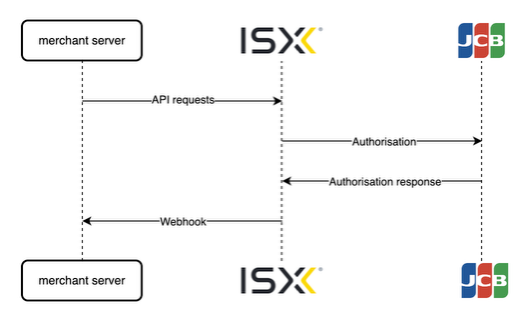
merchant server → ISX: you send 3 API requests — an initial recurring setup (refer to Section 8), subsequent charges (refer to Section 9), and a cancellation (refer to Section 10).
ISX → JCB: ISX handles the scheme-side protocol, including J/Secure on the first payment. You do not interact with JCB directly.
ISX → your server (webhook): a recurring agreement ID is delivered to your webhook on first-payment success (refer to Section 11). Subsequent charges also produce webhooks for status updates.
5. Capabilities
|
Capability |
Description |
|
Initial recurring setup |
Take customer's first payment with full 3D Secure (J/Secure) verification and create a recurring agreement. Returns agreement ID. |
|
Subsequent recurring charges |
Bill stored card on demand using agreement ID. No customer interaction required. |
|
Cancel a recurring agreement |
Deactivate active agreement at any time. Future charges against it are rejected. |
|
JCB card scheme support |
All JCB cards issued by JCB-supporting issuers, processed end-to-end including J/Secure (JCB's 3D Secure) on first payment. |
|
Webhook delivery of recurring agreement ID |
Recurring agreement ID is delivered to your webhook endpoint on first-payment success — the canonical source for your records. |
6. Supported Use Cases
JCB recurring payments is suitable for any business model where a customer pays a fixed amount or variable amount on a regular basis.
Examples:
- Streaming or content subscriptions (e.g., €9.99/month for entertainment or news service).
- SaaS / digital tool subscriptions (e.g., fixed monthly or annual licence fees).
- Membership fees (e.g., gym, club, professional-association annual or monthly dues).
- Premium service tiers (e.g., fixed-price upgrades billed on a renewal cycle).
- Annual donations or pledges (e.g., fixed contribution amounts to charities or campaigns).
- Usage-based billing (e.g., utilities, metered cloud services).
- Variable-amount memberships.
7. Limitations
The following are the intentional limits of JCB recurring payments through ISX:
|
Limitation |
What it means for you |
|
JCB cards only |
Integration enables JCB. Other schemes have their own integration paths and are not covered here. |
|
No automatic card update on PAN reissue |
If a customer's JCB card is reissued with a new card number (i.e., lost/stolen/replaced card), stored card becomes stale and subsequent charges will fail. JCB's Account Updater service is not used by this integration, so card number changes are not propagated automatically. A customer must re-enrol with their new card. Expired card numbers are a separate case (refer to the FAQ section below). |
|
No liability shift on subsequent charges |
Subsequent charges are not re-verified by a bank. If a cardholder disputes a charge, chargeback liability lies with you/an acquirer rather than an issuing bank. JCB's recurring-specific chargeback protections still apply, but this is less protected than a first payment. |
|
No scheduling engine |
ISX does not schedule charges. You decide when to bill and send each charge request. There is no minimum, maximum, or enforced interval. You need your own scheduler/cron to fire charges at the right time. |
|
No instalments, no card-on-file one-offs |
Pay-in-N plans, no-show charges, top-ups, and other ‘merchant-initiated but not recurring’ use cases are out of scope. |
|
Cancellation is local |
Deactivating an agreement takes effect immediately on our platform but is not signalled to JCB or an issuer (JCB has no scheme-level cancellation message). You are responsible for stopping further charge requests in your system after cancellation. |
|
Same customer identifier required |
Your internal customer ID supplied at first payment must match every subsequent charge — this is a security check that prevents one customer's agreement being used to charge another. |
8. Initial Recurring Request
The initial recurring request is the same POST /v1/authorization/ request that you already use for card payments, with the following 3 additions:
|
Field |
Value |
Purpose |
|
|
Recurring workflow name from ISX. |
Routes request through recurring-enabled workflow. |
|
|
|
Informs ISX to create a recurring agreement upon success. |
|
|
Your internal customer ID. |
Locked to agreement; must match on every subsequent charge. |
Endpoint
Request Method: POST
POST /v1/authorization/Request body (additions only)
The full body uses the same structure as your existing authorization (refer to Card Payments). Below is the difference:
{
"workflow": "<your-recurring-workflow-name>",//added & provided by ISX
"merchant": {
"id": "<your-merchant-id>"
},
"transaction": {
"id": "<unique-transaction-id>",
"reference": "<your-order-reference>",
"amount": "1124",//amount in minor units (1124 = €11.24)
"currency": "EUR",
"init_recurring": true//added
},
"client": {
"ip": "<cardholder-ip>",
"first_name": "...",
"last_name": "...",
//...full client block as per Card Payments
},
"account": {
"identifier": "<your-internal-customer-id>"//added or already present in your integration
}
//'cardholder'/card data block as per your existing flow, if applicable
}
Explanation
Cardholder goes through your standard checkout and 3D Secure (J/Secure) flow. Upon success, ISX:
- Creates and activates a recurring agreement.
- Sends webhook with a recurring agreement ID (refer to Section 11).
The synchronous response is identical to a regular authorization. A recurring agreement ID itself is delivered via webhook — that is the canonical source.
9. Subsequent Recurring Request
Once you have a recurring agreement ID, you can charge the same card on demand without any cardholder interaction. This uses a different endpoint from your existing authorization.
Endpoint
Request Method: POST
POST /v1/recurring/authorization/
Required fields
|
Field |
Value |
|
|
The same recurring workflow used for initial. |
|
|
Your merchant ID. |
|
|
Unique per request (do not reuse a previous value). |
|
|
An agreement ID from initial webhook. |
|
|
Exact match of value used in initial. |
|
|
Standard client block (same fields as normal request). |
|
|
Amount. Applicable only for variable amounts. |
|
|
Currency. Applicable only for variable amounts. |
Fields that must not be present
|
Field |
Why this field must not be present |
|
|
Only valid on initial request. |
|
|
Card details come from ISX vault; you do not (and cannot) supply them. |
Request body
Fixed amount
{
"workflow": "<your-recurring-workflow-name>",
"merchant": {
"id": "<your-merchant-id>"
},
"transaction": {
"id": "<unique-transaction-id>",
"reference": "<your-order-reference>",
"recurring_id" :"<agreement-id-from-initial-webhook>"
//no 'amount' or 'currency' is included here
},
"client": {
"ip": "<server-or-customer-ip>",
"first_name": "...",
"last_name": "...",
//...same client fields as your normal request
},
"account": {
"identifier": "<your-internal-customer-id>" //same as initial
}
}
Variable amount
{
"workflow": "<your-recurring-workflow-name>",
"merchant": {
"id": "<your-merchant-id>"
},
"transaction": {
"id": "<unique-transaction-id>",
"reference": "<your-order-reference>",
"recurring_id" :"<agreement-id-from-initial-webhook>",
"amount": "1124", //amount in minor units (1124 = €11.24)
"currency": "EUR", //same as initial
},
"client": {
"ip": "<server-or-customer-ip>",
"first_name": "...",
"last_name": "...",
//...same client fields as your normal request
},
"account": {
"identifier": "<your-internal-customer-id>" //same as initial
}
}
Explanation
ISX looks up an agreement by recurring_id + account.identifier, retrieves card from vault, and submits charge to JCB. No 3D Secure step and no cardholder interaction.
You can repeat this request as many times as your product requires (with a different transaction.id each time). An agreement remains active and reusable until you deactivate it.
Notes
For a fixed amount neither amount nor currency fields are required. For a variable amount both amount and currency fields are required.
For a variable amount the amount must be in minor units (i.e., cents) (i.e., 1124 = €11.24).
For a variable amount the currency must be the same as the initial currency.
10. Cancelling a Recurring Agreement
When a customer cancels their subscription, deactivate an agreement so no further charges can be made against it.
Endpoint
Request Method: POST
POST /v1/recurring/{recurringId}/deactivate
{recurringId} is an agreement ID from an initial webhook. The body is empty.
Response
200 OK with a JSON feedback message similar to the following:
{
"feedback": "Request has passed validation and processed successfully, result: DEACTIVATED"
}
After deactivation:
- Subsequent charge attempts against this agreement are rejected.
- An agreement cannot be reactivated. To resume billing, set up a new recurring agreement (which means fresh first payment from customer).
- ISX does not send notification to JCB (i.e., deactivation is local to ISX). You are responsible for ceasing further charge requests in your system.
11. Getting a Recurring Agreement ID from Webhook
A recurring agreement ID is delivered to your webhook endpoint on first payment success. Webhook delivery uses your existing webhook configuration — no changes required on your side.
What to listen for
Watch for transaction_accepted event on a transaction whose originalMessage.transaction.initRecurring is true. Agreement ID is a JSON path:
$.cardReference.recurringId
Example webhook payload (relevant snippet)
{
"event": "transaction_accepted",
"state": "ACCEPTED",
"compoundState": "COMPLETED/ACCEPTED",
"id": "<isx-transaction-id>",
"originalMessage": {
"merchant": {
"id": "<your-merchant-id>"
},
"transaction": {
"id": "<your-transaction-id>",
"initRecurring": true
}
},
"cardReference": {
"maskedPan": "356611****1113",
"cardBrand": "JCB",
"expiryDate": "01/30",
"recurringId": "cd0f31b0-3907-493b-8fe4-659c3f0a7678",
"cardCountry": "JP"
},
"responseCode": "00"
}
What to store
For each successful recurring agreement, persist the following against your customer record:
|
Value |
Where it comes from |
Used in |
|
|
Webhook above. |
Subsequent charge requests, deactivation. |
|
Your |
Your own request. |
Subsequent charge requests (exact match). |
If a webhook arrives without a cardReference.recurringId, an agreement was not created (i.e., treat it as a failed enrolment and do not attempt subsequent charges).
12. Common Integration Errors
|
Error message |
Cause |
Fix |
|
|
The |
Use the exact same identifier as the initial. |
|
|
|
Remove the currency field. |
|
|
|
Remove the flag — it belongs only on the initial. |
|
|
A |
Remove it — a card comes from the vault. |
|
|
|
Add the agreement ID from the initial's webhook. |
|
Transaction rejected — duplicate |
A previous request used the same |
Use a unique value per request. |
|
Subsequent declined for a known agreement |
Agreement is in DEACTIVATED or FAILED state. |
Check agreement state via dashboard; if dead, set up a new agreement. |
|
Initial succeeds but no |
Agreement was not activated server-side — ISX issue. |
Contact your ISX account manager. |
13. FAQ
Question: Will a customer see a 'verify with your bank' pop-up every month?
Answer: No. Bank verification (3D Secure) only happens on the very first payment. Every charge after that is fully automatic — no pop-ups, no SMS codes, no app prompts.
Question: What happens if a customer's card expires?
Answer: An expired card on its own should not stop a recurring charge. JCB scheme rules state that issuers must not decline a recurring transaction solely because a card's expiry date is in the past or missing. The original expiry captured at first payment is sent to JCB on every subsequent charge and the charge is flagged as recurring so an issuer can apply the right rule. In practice, results may vary by issuer (and JCB's stand-in authorization may still decline expired cards), so a small share of expired-card charges may be declined. If they are, a customer should re-enrol with their new card.
Question: What happens if a customer's card is reissued with a new number?
Answer: This is a different case from expiry. A stored agreement is bound to an original card number; if a customer is issued with a new card number (lost/stolen/replaced), an agreement becomes stale and subsequent charges will fail. Card number changes are not propagated automatically. You will need to ask a customer to set up a recurring agreement again with their new card.
Question: Can a customer cancel?
Answer: There is no customer-facing cancellation flow on ISX (i.e., cancellation goes through you). When a customer cancels in your system, you call our deactivate endpoint with an agreement ID. After that, any further charge attempts on that agreement are rejected.
Question: How do refunds work?
Answer: Refunds work the same as for any other transaction (refer to Card Payments). Refunding a recurring charge does not deactivate a recurring agreement — it stays active and you can continue to charge it (or deactivate it explicitly) until a customer cancels.
Question: What happens if a subsequent charge is declined?
Answer: AN agreement stays active — a single decline does not deactivate it. Yo will receive a decline response and can decide how to handle it (retry later, dunning email, deactivate). Repeated declines for issuer reasons (e.g., lost/stolen card) typically mean a card is no longer usable; deactivating is the correct action in that case.
Question: How does this affect chargebacks?
Answer: First payments carry a full chargeback protection of 3D Secure, with liability typically with an issuer. Subsequent charges do not have a fresh bank verification, so JCB's specific recurring chargeback protections apply but liability sits with you/an acquirer for many reason codes.
Question: Do I need to send 3D Secure data on subsequent requests?
Answer: No. 3D Secure parameters (e.g., CAVV, ECI, XID) must not be present on subsequent recurring requests — JCB scheme rules prohibit reusing initial 3DS data for subsequent charges. Just send fields described in Section 9.
Question: Is there a maximum number of charges I can make against an agreement?
Answer: No. An agreement remains active and reusable until you deactivate it, a customer's card becomes unusable (lost/stolen/reissued), or an agreement is otherwise marked failed by ISX.
If any issues arise, contact the ISX relationship management team.